Welcome to SINTRONES FAQ section. Seek answers to the frequently asked questions here.
If you are unable to locate the information you require, please complete our FAQs form, and we shall expeditiously attend to your inquiries.
Yes. The GPS module integrates a 3-axis G-Sensor that can provide X, Y, and Z axis acceleration data for vehicle motion detection, impact monitoring, and driving behavior analysis.
The G-Sensor can be accessed through the SMBus interface.
1. Address Information
|
Address |
Name |
Description |
|
0xEFA0 |
SMB_BASE_ADDR |
VMB-3122 SMBus base address |
|
0x3A |
G_SENSOR_ADDR |
Read: bit0 = 1, Write: bit0 = 0 |
2. Initial G-Sensor Register Definition
|
Hex |
Dec |
Name |
Type |
Description |
|
0x31 |
49 |
DATA_FORMAT |
R/W |
Data format control. |
|
0x2D |
45 |
POWER_CTL |
Power-saving features control. |
|
|
0x2E |
46 |
INT_ENABLE |
Interrupt enable control. |
3. Calibration Register Definition
|
Hex |
Dec |
Name |
Type |
Description |
|
0x1E |
30 |
OFSX |
R/W |
X-Axis offset. |
|
0x1F |
31 |
OFSY |
Y-Axis offset. |
|
|
0x20 |
32 |
OFSZ |
Z-Axis offset. |
4. X, Y, Z Data Register Definition
|
Hex |
Dec |
Name |
Type |
Description |
|
0x32 |
50 |
DATAX0 |
R |
X-Axis data 0. |
|
0x33 |
51 |
DATAX1 |
X-Axis data 1. |
|
|
0x34 |
52 |
DATAY0 |
Y-Axis data 0. |
|
|
0x35 |
53 |
DATAY1 |
Y-Axis data 1. |
|
|
0x36 |
54 |
DATAZ0 |
Z-Axis data 0. |
|
|
0x37 |
55 |
DATAZ1 |
Z-Axis data 1. |
Verify the system BIOS date and time settings. An incorrect RTC/BIOS clock may cause package signature validation, SSL certificate verification, and GNOME service initialization failures, resulting in the installer appearing to hang during package configuration.
On Windows systems, the ignition shutdown behavior is linked to the system power button action.
To allow the system to perform a graceful shutdown when IGN is turned off, please configure the Windows power button behavior as Shut down.
Steps:
- Open Control Panel.
- Go to Power Options.
- Select Choose what the power buttons do.
- Set When I press the power button to Shut down.
- Save the changes.
When the IGN signal is turned off, the system will trigger the configured power button action and allow Windows to perform a normal shutdown process.
Note:
If the power button action is set to Sleep, Hibernate, or Do nothing, the system may not shut down properly when IGN is turned off.
IGN Only Mode is designed to keep the system power behavior controlled by the ignition signal.
When the system is shut down by software, the system may enter a standby state instead of being completely powered off.
If IGN Only Mode is enabled and the IGN signal remains active, the system will automatically power on again within a few seconds after software shutdown.
This behavior ensures that the system stays powered on as long as the vehicle ignition signal is present.
SINTRONES platforms support automatic system startup after external power is restored.
To configure this feature:
- Enter the BIOS Setup Utility.
- Navigate to:
Advanced → AC Power Loss - Select the desired behavior:
- Power Off – The system remains powered off after power is restored.
- Power On – The system automatically powers on when power is restored.
- Last State – The system returns to its previous power state before power loss.
- Save the BIOS settings and reboot the system.
Note:
1. The available options and menu locations may vary depending on the platform model and BIOS version. Please refer to the product user manual for detailed instructions.
2. For platforms equipped with Ignition Power Management, the IGN signal must remain active (IGN ON) for the system to power on successfully after AC power is restored.
If the IGN signal is not present, the system may remain in the power-off state even when AC Power Loss is configured as Power On.
Please ensure that both the external power source and IGN signal are available when using the automatic startup function.
Common diagnostic tools include:
Windows:
Event Viewer
Linux:
dmesg

journalctl
Providing logs can significantly speed up troubleshooting.
Secure Boot only allows digitally signed bootloaders and operating systems to start.
If the USB installer contains:
- Unsigned bootloaders
- Custom Linux distributions
- Modified Windows PE images
the system may block the boot process.
In such cases, try:
- Using a Secure Boot compatible installation image.
- Temporarily disabling Secure Boot.
- Verifying that the installation media was created correctly.
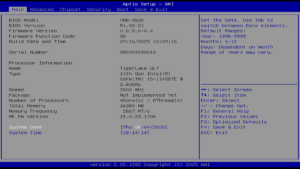
The BIOS version information can be viewed during system startup or from the BIOS Setup Utility, as shown in the screen below.
To help us investigate efficiently, please provide:
- Product Model
- Serial Number
- BIOS Version
- Operating System Version
- Problem Description
- Photos or Videos (if available)
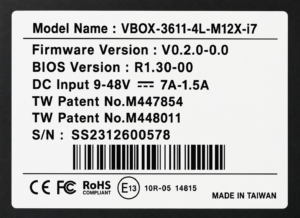
The product model name and serial number can be found on the product label attached to the chassis.